Build your digital golf bag in five minutes.
Everything FitMyGolfClubs does — your fit grade, gap analysis, shaft-consistency check, recommendations — starts from an accurate picture of what's actually in your bag. Build it once, by photo or by hand, and it pays off every time you grade, test a change, or talk to a fitter.
Grade My Bag Free →5 free credits · no credit card required

Every club with full specs — and a Good Fit or Attention flag.
The app walks you through it, one club at a time.
New accounts land on "Set Up Your Bag." Tap Start Adding Clubs — no golf-tech knowledge required.
- ✓ Photo or manual — snap photos and let the app pull the details, or type them in. Have your clubs nearby; it's faster with them in hand.
- ✓ Progress saves as you go — step away, come back, and a Resume Adding Clubs button picks up where you left off
- ✓ Not ready? Skip for now and add clubs anytime from your bag
Pick it. Brand it. Model it. Shaft it.
Whether you're in guided setup or adding one club later, every club is built the same way.
- 1. Pick the club — category (Woods, Hybrids, Irons, Wedges, Putter) and the specific club, like Driver, 7-iron, or 56° wedge
- 2. Choose the brand — search, or tap a popular brand: Callaway, TaylorMade, Titleist, Ping, Cobra, Mizuno, Srixon, Cleveland
- 3. Choose the model — search the catalog for the exact model and year. Not listed? Enter it by hand and it grades just the same
- 4. Confirm the shaft — the stock shaft fills in automatically; if yours is different, search the aftermarket shaft or enter brand, model, and flex
That's one club. A full bag takes just a few minutes — and if you'd rather not type at all, take photos and the app identifies the club for you, then drops you into the same steps to confirm.
Now the fit engine has something real to grade.
One bag, everything connected
Open My Bag and your clubs are grouped by category with a running count up top. Once a club has a shaft and specs, the fit engine can grade it — the more complete your bag, the sharper the analysis.
- ✓ Grade your bag — the grade card sits at the top; tap for the full 8-factor breakdown
- ✓ Tap any club to see and edit its specs
- ✓ Swap Club / Swap Shaft or remove one from its menu
- ✓ Add Club anytime as your set evolves
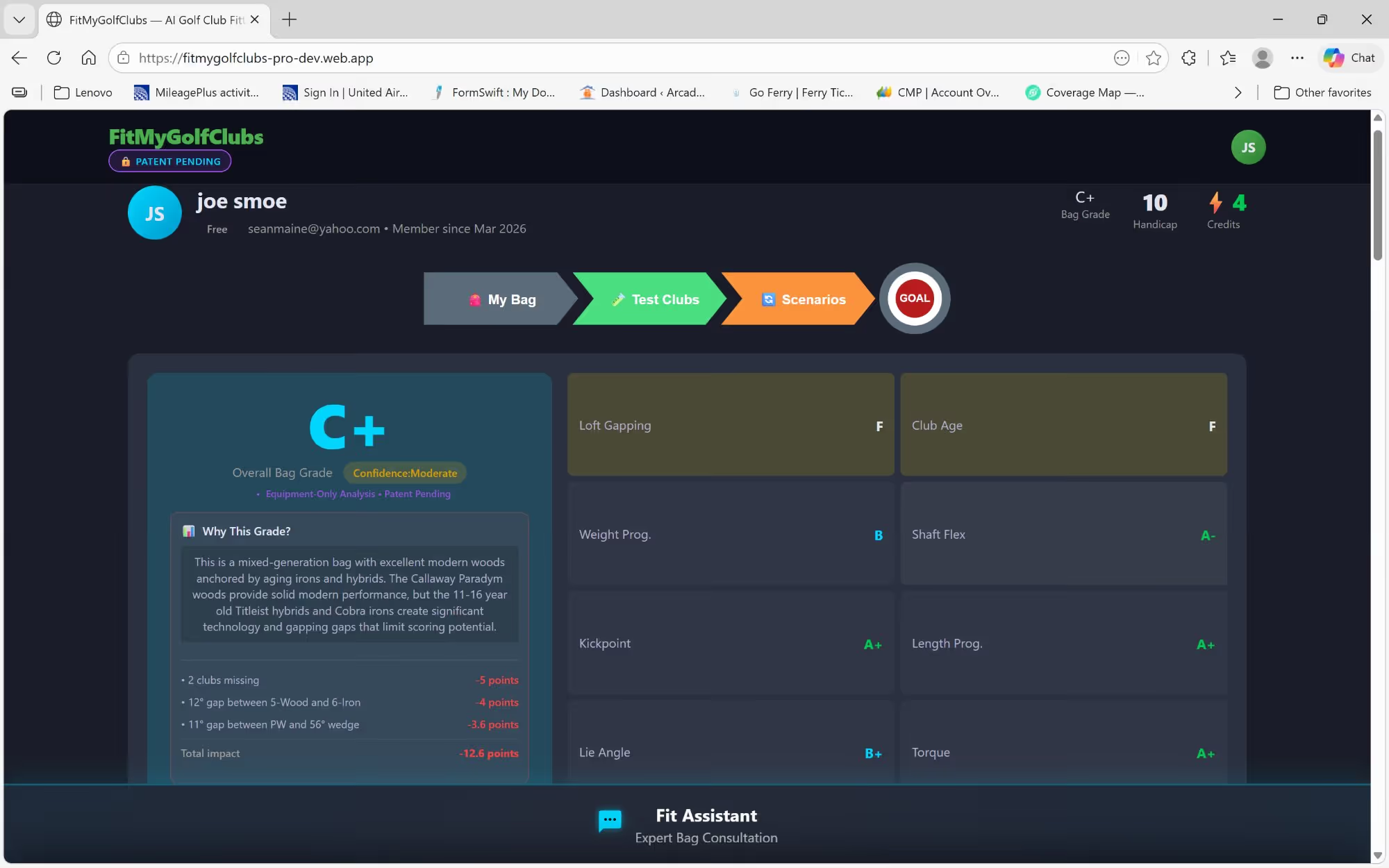
The payoff — your whole bag graded across 8 fitting factors.
A half-entered bag gives you a half-accurate grade.
The five minutes you spend getting brands, models, and shafts right is what turns FitMyGolfClubs from a club list into a fitting tool — one that can tell you your 3-hybrid is a flex mismatch, your wedges are gapped too tightly, or your driver shaft is heavier than your swing wants.
Build your bag and see how it really fits.
Add your clubs by photo or by hand, then grade your bag in minutes.
Grade My Bag Free →Common questions
No. You can take photos and let the app identify each club, then just confirm the details. Manual entry is there for when you'd rather type, or for a club that isn't in the catalog.
You can enter it manually — brand, model, year, and loft/lie/length for the head, and brand/model/flex for the shaft. It's added and graded just like a catalog club.
No. Your progress saves as you go, and a "Resume Adding Clubs" button brings you back to where you left off, with the clubs you already entered intact.
You can add a putter to keep your bag complete, but the fit grade focuses on the clubs where specs like loft, lie, length, and shaft drive performance. Adding your full set of woods, hybrids, irons, and wedges is what makes the grade meaningful.