Bent, cut down, or reshafted? Log the real specs.
When you add a club, it starts with the factory specs from our catalog. But if you've had work done — irons bent a couple degrees, a driver cut down, a wedge reshafted — the factory numbers no longer describe the club in your bag. And your fit grade is only as accurate as the specs it's grading.
Grade My Bag Free →5 free credits · no credit card required
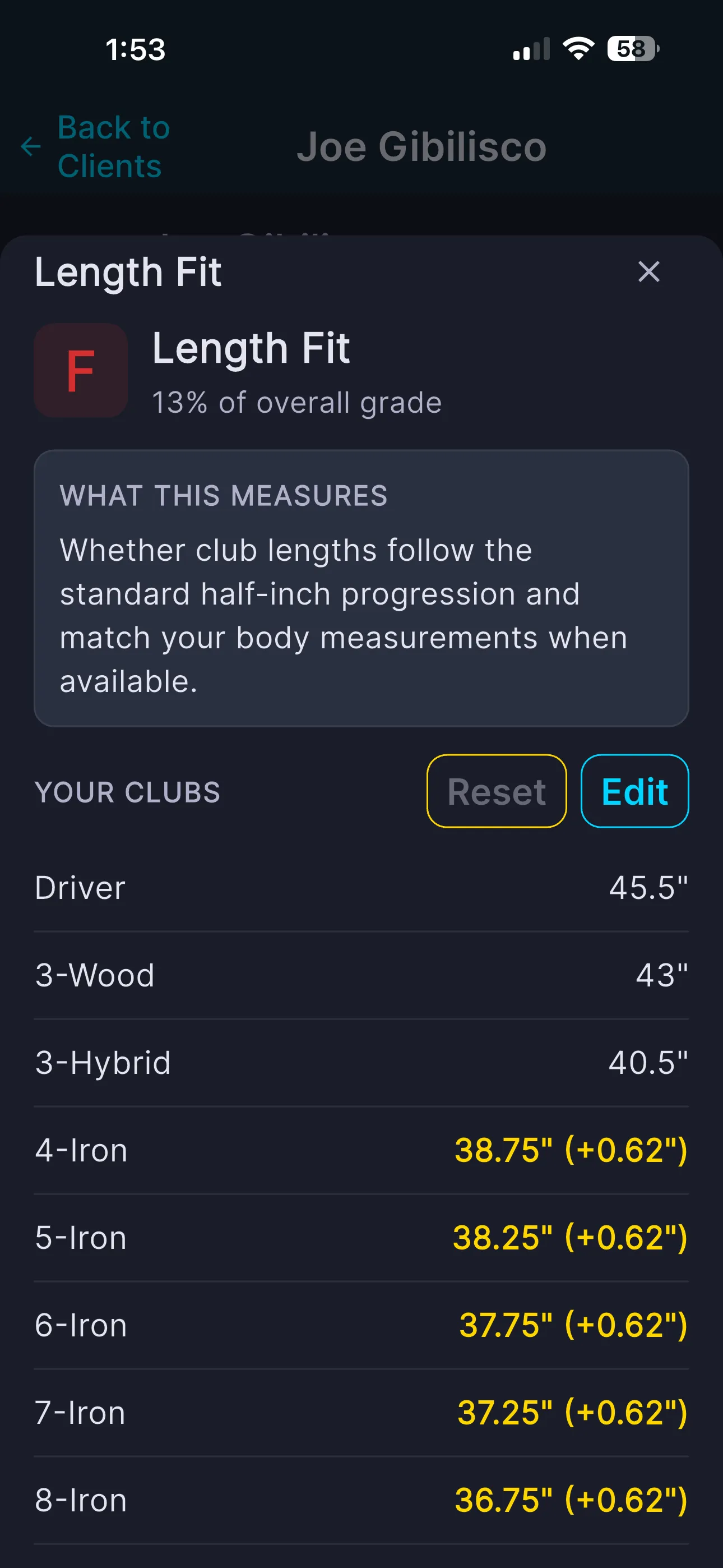
Every iron +0.62" over spec — the grade caught it instantly.
Any time a club no longer matches the factory.
If none of these apply, you're fine on the catalog specs — no need to touch anything.
- ✓ Bent for lie or loft — irons or wedges bent upright/flat or strong/weak
- ✓ Cut down or extended — a driver tipped and trimmed, or irons built over/under standard length
- ✓ Reshafted — a different shaft, flex, or weight than the stock build
- ✓ Adjusted at a fitting — any spec a fitter changed from the catalog default
One minute per club — and fully reversible.
Open your bag, tap the club, and open Edit Club. Change whatever's different from stock, then tap Save Changes.
- ✓ Club head: Brand, Model, Year, Loft, Lie, Length
- ✓ Shaft: Brand, Model, Flex, Weight, Torque, Kickpoint
- ✓ Every edit gets an "edited" marker — the factory value stays on record as "Original: X"
- ✓ Reset any single spec, or hit Reset All Edited Specs to go back to factory
- ✓ The app flags your bag as needing a re-grade after you save
One change across the whole set? Don't open every club.
Fix it from the grade itself
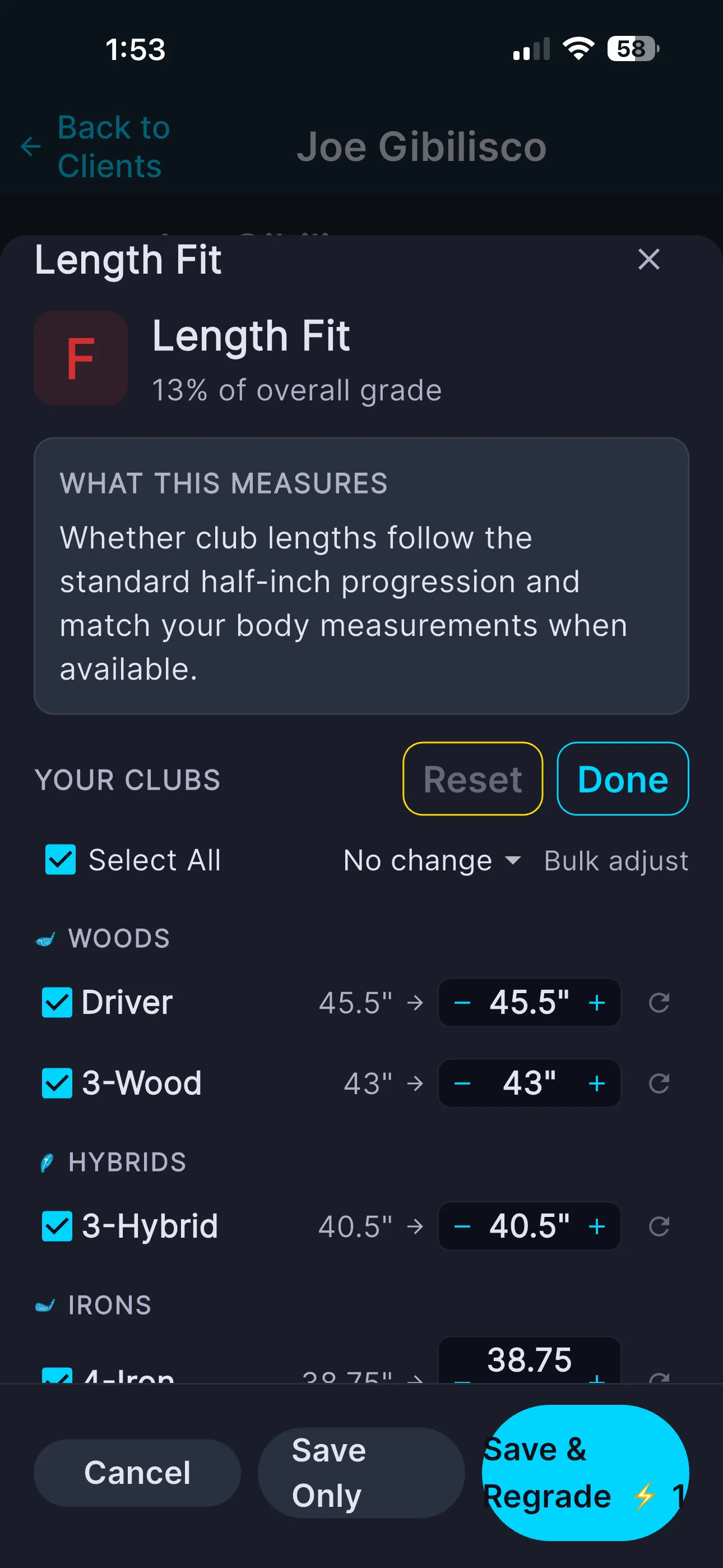
Say your whole set was bent one degree upright, or your irons were all built half an inch over. From your grade, tap the relevant factor, hit Edit, and adjust that one spec across the affected clubs right in the factor view.
- ✓ Tap a factor like Length Fit or Lie Angle → Edit
- ✓ Adjust each club with steppers — or Select All and bulk-adjust
- ✓ Save & Regrade shows the corrected grade immediately
- ✓ Save Only if you want to record changes and grade later
Grade the bag you play — not the one in the catalog.
A fit grade on factory specs answers "how well does the stock version of this club fit me?" That's the wrong question if your club isn't stock anymore. Log the real specs and the grade answers the question you actually care about: how well do the clubs in your bag, exactly as they're built right now, fit you. That's the number worth trusting before you spend money on your next change.
Make your grade match your bag.
Log your real specs and re-grade — it takes a minute and makes every fit factor honest.
Grade My Bag Free →Common questions
No. Every edited spec keeps its factory value on record and shows "Original: X." Each edit has a reset control, and a "Reset All Edited Specs" button returns the whole club to its catalog spec — any change you log is fully reversible.
Brand, model, year, loft, lie, length, shaft brand, shaft model, flex, shaft weight, torque, and kickpoint. Change whichever ones differ from how the club left the factory.
Your last grade becomes out of date once you change a spec, and the app flags the bag as needing a re-grade. Run the grade again so every fit factor reflects your actual clubs — or use Save & Regrade inside a factor to update it right away.
Often, yes. If a club has been bent, cut down, extended, or reshafted, the grade is scoring the factory build rather than your real club. Log the real specs and re-grade, and the numbers should line up with what you actually play.